Kitchen · KDS and tickets
A kitchen display system and tickets for your restaurant
The Lumix POS kitchen display replaces paper slips: every order arrives by table, with its minutes and each dish's options, until the kitchen marks it Ready.
Already using Lumix POS? Sign in
What it does
The kitchen sees what the floor sees, right away
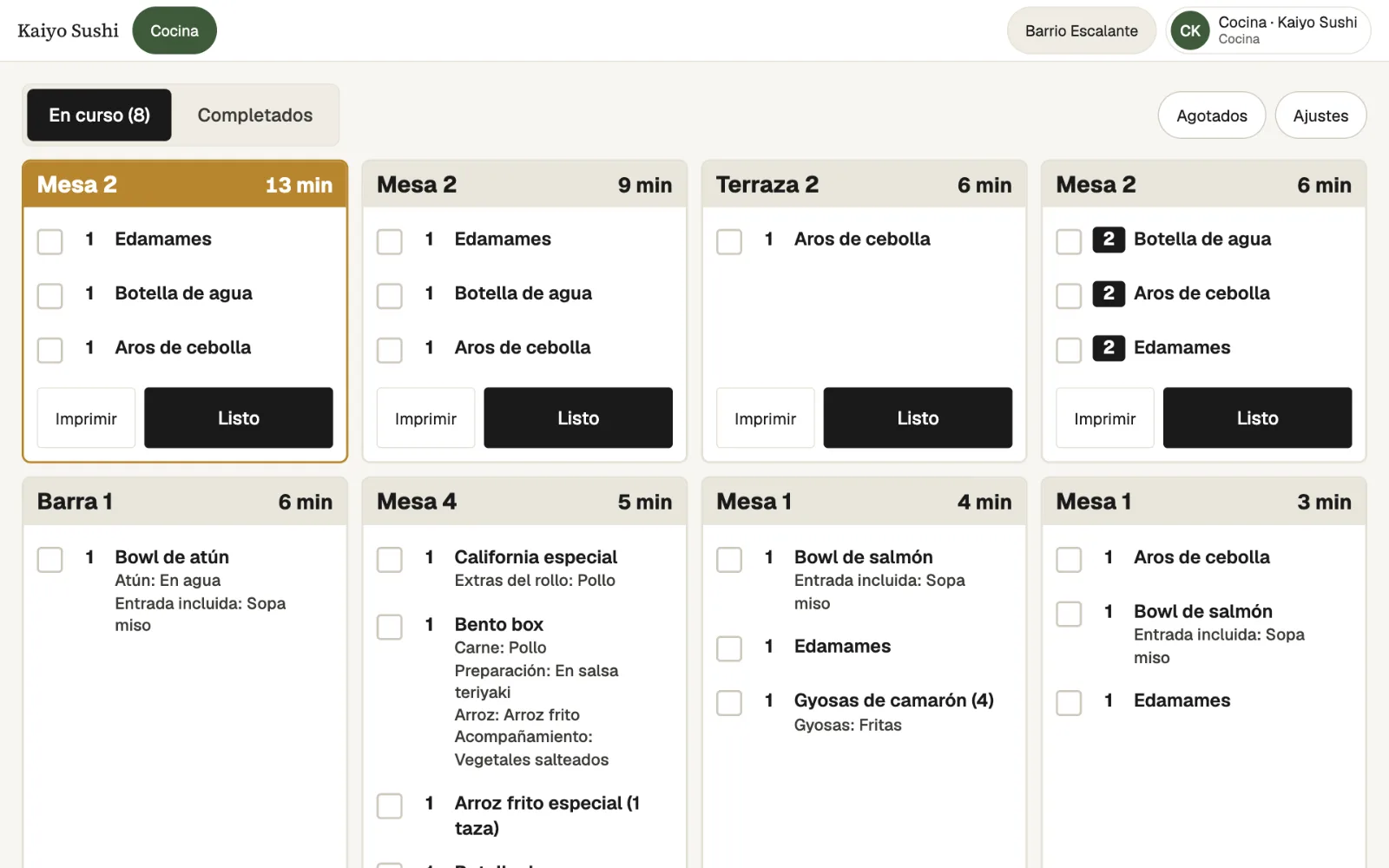
When a server taps Send to kitchen, the ticket appears on the kitchen display with the table or takeaway name, the server, the minutes it has been waiting and each dish with its quantity, its options and the server's note.
Each ticket's color shows how it is going: gray on time, amber past that station's usual time, and red well past it. If the floor changes or voids a dish that was already sent, the ticket shows it tagged CAMBIO (changed) or struck through, with nothing for the kitchen to tap.
A Por preparar (to prepare) panel adds up how many of each dish are still owed across all open tickets, so the cooks can make them in one go. When a ticket is done, the kitchen taps Ready. If it was marked by mistake or the dish came back, it can go back to preparing from Completados (completed).
The display can run on a tablet, on a wall TV, or both. And if your kitchen prefers paper, tickets also print on 58 or 80 mm Bluetooth thermal printers, from Chrome on Android or a computer, or with the RawBT app on Android.
- Tickets per table. With their minutes, each dish's options, notes and an URGENTE (rush) flag.
- Ready in one tap. The ticket leaves the board, and can go back to preparing from Completed.
- Stations. Each menu category goes to its station, such as kitchen or bar, and each station can see only its own.
- Wall TV. Connected once with a 6-digit code, with nobody signing in on the TV.
- Printed tickets. On 58 and 80 mm Bluetooth thermal printers, from Android or a computer, with ANULADO (void) and CAMBIO (change) slips when the floor corrects an order.
- Ready to serve. If you turn it on, servers see what the kitchen finished, grouped by table.
Step by step
How a dish gets from the table to the kitchen
The server sends it
They take the order with its options and tap Send to kitchen. Only new items go, never the whole table again.
The kitchen sees it
The ticket appears at the right station, on the tablet, the TV or the printer.
Cooked and marked
The minutes run on screen. When it's done, the kitchen taps Ready.
Out to the table
The server knows what is ready, and the table shows as served on the floor.
-
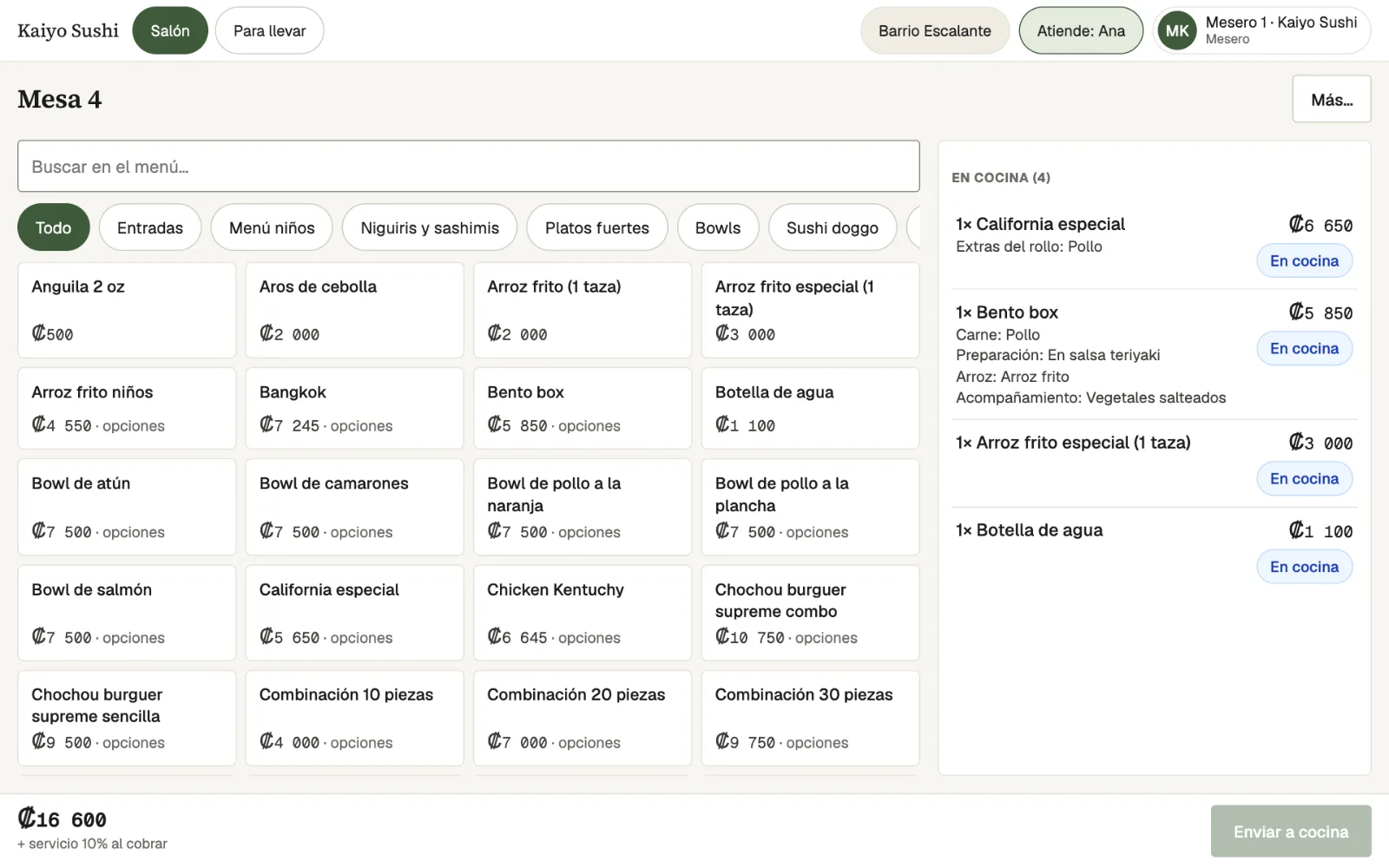
From the orderThe options the server picks, such as the meat or the side, reach the kitchen exactly as ordered. -
In the kitchenTickets with their minutes, each dish's options and the Print and Ready buttons. -
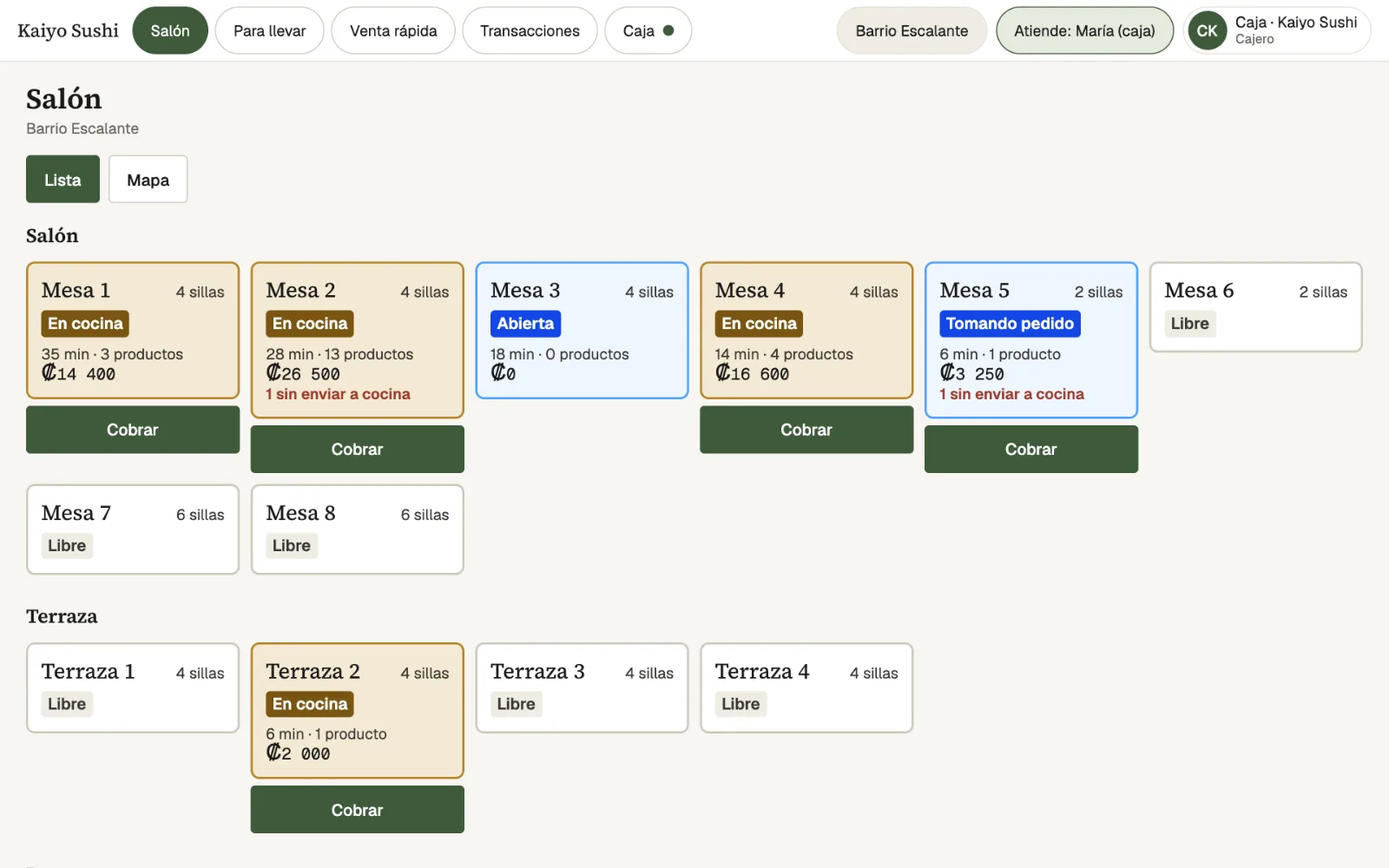
On the floorEach table shows whether it is in the kitchen, how long it has waited and its total.
Who it's for
Which kitchens it fits
Busy kitchens
The Por preparar panel and the time colors help keep the line in order at peak hours.
Separate kitchen and bar
Each station sees and prepares only its own, and each send can print one ticket per station.
Kitchens that prefer paper
Tickets printed on Bluetooth thermal printers, with slips when the floor changes or voids a dish.
Takeaway and delivery
Orders with no table reach the same display under their own name, such as the channel and the customer.
Frequently asked questions
What people usually ask
What hardware does the kitchen display need?
A tablet or a TV with a browser. For a TV, a manager adds it from the tablet, gets a 6-digit code and types it once on the TV.
Can I keep printing kitchen tickets?
Yes. Tickets print on 58 or 80 mm Bluetooth thermal printers, on their own or alongside the display, from Chrome on Android or a computer, or with the RawBT app on Android (iPad and iPhone can't print over Bluetooth). If a dish is voided or changed after it was sent, an ANULADO (void) or CAMBIO (change) slip prints.
Can kitchen and bar be separated?
Yes. Each menu category is assigned to a station, and the restaurant can choose to send one ticket per station.
What if a server changes a dish that was already sent?
The ticket shows it right away: a voided dish is struck through and a changed one is tagged CAMBIO (changed), with the time.
How do I know if the kitchen is falling behind?
Each ticket changes color against its station's usual time, and the reports show kitchen speed.
Can a Ready be undone?
Yes. From Completados (completed), Volver a preparar (back to preparing) returns the ticket to the board.
Also in Lumix POS
The rest of the system, connected
Contact
Bring order to your kitchen with Lumix POS
Request a demo and we will show you how tickets reach the kitchen, on screen, on the TV or on paper.